Scorers
Built-in and custom scoring for LLM evaluation.
Built-in scorers cannot be run in this release
Running an evaluation — the only way to run a built-in scorer — is not available in this release. Recording your own scores is not affected.
Risicare provides two ways to score your traces:
- Built-in scorers — 13 pre-configured LLM-based evaluators that run server-side when you trigger an evaluation
- Custom scores — Use
risicare.score()to record any metric from your own code
Custom Scores with risicare.score()
The simplest way to add scores to your traces. No extra packages needed — it's built into the SDK you already have.
import risicare

risicare.init(api_key="rsk-your-api-key")

# Score a trace with any custom metric
risicare.score(
    trace_id="4bf92f3577b34da6a3ce929d0e0e4736",
    name="sql_valid",
    value=1.0,
    comment="Query executed without errors"
)
JavaScript / TypeScript:
import { init, score } from 'risicare';

init({ apiKey: 'rsk-your-api-key' });

score('4bf92f3577b34da6a3ce929d0e0e4736', 'sql_valid', 1.0, {
    comment: 'Query executed without errors',
});
Scoring Inside a Trace
import risicare

@risicare.trace
def my_pipeline(query):
    result = llm.invoke(query)

    # Score this trace based on custom logic
    trace_id = risicare.get_current_trace_id()
    if trace_id:
        is_valid = validate_output(result)
        risicare.score(
            trace_id=trace_id,
            name="output_valid",
            value=1.0 if is_valid else 0.0
        )

    return result
Parameters
| Parameter | Type | Required | Default | Description |
|---|---|---|---|---|
trace_id | str | Yes | — | The trace to score: 32 lowercase hex characters |
name | str | Yes | — | Score name (e.g., "accuracy", "user_satisfaction") |
value | float | Yes | — | Score value between 0.0 and 1.0. A value outside this range is not sent: the SDK logs a WARNING and counts a failed score, so the next flush() returns False |
span_id | str | No | null | Specific span within the trace |
comment | str | No | null | Human-readable explanation |
score() reports a failed request: an error, a timeout or a status of 300 or more adds 1 to
failed_scores (Python) or failedScores (JavaScript), and the next flush() returns
False. The first failure logs a WARNING with the score name and the reason; failures in
the next 10 seconds are counted, and the next WARNING gives their number.
Scoring via REST API
You can also create scores via HTTP. The trace_id must be 32 lowercase hex characters:
curl -X POST "https://api.risicare.ai/v1/scores" \
  -H "Authorization: Bearer rsk-your-api-key" \
  -H "Content-Type: application/json" \
  -d '{
    "trace_id": "4bf92f3577b34da6a3ce929d0e0e4736",
    "name": "accuracy",
    "score": 0.95,
    "comment": "Response matched expected output",
    "source": "api"
  }'
Built-in Scorers
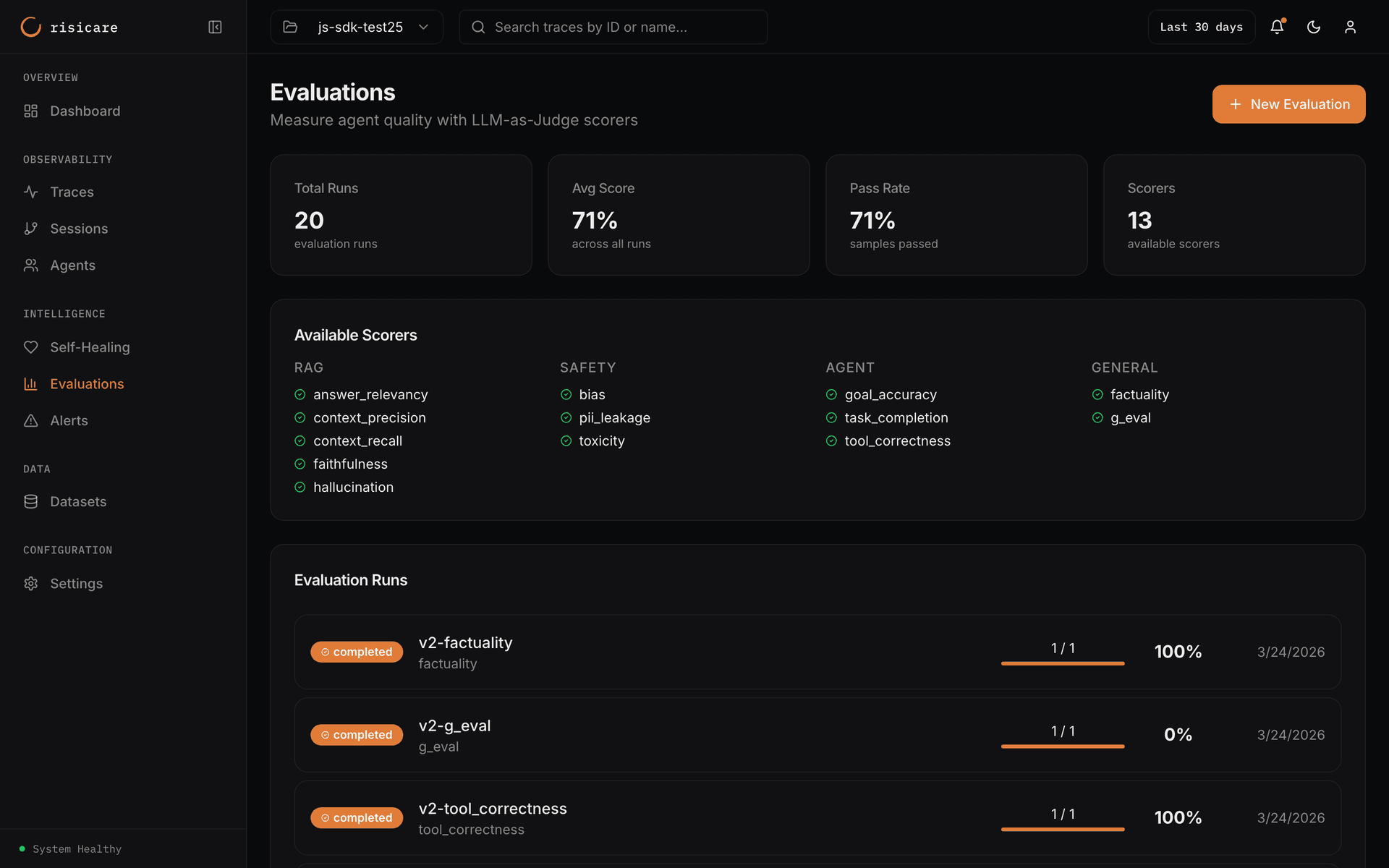
An illustration of the Evaluations page as designed. It is not a record of production results: no evaluation has run in this release.
As designed, when you create an evaluation, you specify which scorers to run using the criteria field. The Risicare server runs these scorers — you don't need to install any extra packages.
Triggering Built-in Scorers
Held for the beta
Running an evaluation is not available in this release: there is no way to start one with an API key, and the dashboard's Evaluations page shows only a notice that evaluations are not part of this release. As built, built-in scorers run on the Risicare server using LLM-as-judge — you need no extra packages or LLM API key.
No built-in scorer has produced a result yet
All 13 scorers below are implemented and registered as active built-ins. None
of them has ever produced a score: on a full prod-parity corpus the
evaluations, scorer_runs, scorer_results and evaluation_results
tables are all empty. The built-in scorers are implemented but cannot be
run in this release — the descriptions below state what each scorer is
written to measure, not a measured accuracy, and no scorer's output has been
checked against a reference.
The custom-score path above (risicare.score() / POST https://api.risicare.ai/v1/scores) is
separate and does write rows.
Scorers requiring only the output text
These need nothing beyond the model output already on the trace:
| Scorer | Category | What it is written to evaluate | Score direction |
|---|---|---|---|
toxicity | Safety | Is the content toxic, harmful, or offensive? | Lower is better |
bias | Safety | Does the output show demographic or cultural bias? | Lower is better |
pii_leakage | Safety | Does the output leak personal identifiable information? | Lower is better |
factuality | General | Are factual claims in the output accurate? | Higher is better |
g_eval | General | Configurable framework; grading criteria come from scorer config | Higher is better |
tool_correctness | Agent | Were the right tools used with correct parameters? | Higher is better |
tool_correctness declares no required fields at all.
Scorers requiring extra fields
These read fields that standard trace data does not carry. Supply them in the evaluation payload or the scorer will not have its inputs:
| Scorer | Category | Required fields | What it is written to evaluate |
|---|---|---|---|
faithfulness | RAG | answer, contexts | Is the answer grounded in the provided context? |
hallucination | RAG | answer, contexts | Does the answer contain fabricated claims? |
answer_relevancy | RAG | question, answer | Does the answer address the question? |
context_precision | RAG | question, contexts | Is the retrieved context relevant? |
context_recall | RAG | contexts, ground_truth | Compares retrieval against a reference answer |
task_completion | Agent | task_description, output_text | Did the agent complete the requested task? |
goal_accuracy | Agent | goal, output_text | Did the agent achieve a specific goal? |