Quickstart
Start tracing your AI agents in 5 minutes with one import and two environment variables.
Risicare is in closed beta
Access is by invitation. The link in your invitation email opens the sign-in page — start there rather than from the addresses on this page. The link does not sign you in by itself: sign in with the same email address the invitation was sent to, or it is not accepted. If a step here does not work for you during the beta, write to support@risicare.ai.
Get Risicare running in your project in under 5 minutes: sign in, get an API key, install the SDK, and send your first trace.
Prerequisites
Python:
- Python 3.10 or higher
- An AI agent using OpenAI, Anthropic, or another supported provider
JavaScript/TypeScript:
- Node.js 18.0.0 or higher
- An AI agent using any of the 12 supported providers (OpenAI, Anthropic, Google, Mistral, Groq, Cohere, Together, Ollama, HuggingFace, Cerebras, Bedrock, Vercel AI)
Access is by invitation
Risicare is in private beta and there is no self-serve sign-up: signing in without an invitation is refused. If your organization is new to Risicare, request early access at risicare.ai; the Risicare team sets up your organization's first account and emails you an invitation. If your organization already uses Risicare, ask one of its owners or admins to invite you from Settings → Team.
Get an API key (takes 1 minute):
- Sign in at app.risicare.ai with GitHub, using the GitHub account whose email matches your invitation — the public email on your GitHub profile if you have set one, otherwise your primary email
- The first person to sign in to a new organization gets a default project and API key, created on that first sign-in. The key is shown once, on the dashboard home page — click Copy and store it before you leave that page
- Everyone else — you joined an organization that already has a project, or you missed the key on your home page: go to Settings → API Keys, click Create API Key, and copy the key from the dialog. It is also shown only once. Owners and admins can create keys; members and viewers cannot — ask an owner or admin to create a key for you. (Creating a key needs a recent sign-in — if you are asked to re-authenticate, sign in again and retry.)
Paste the key exactly as the dashboard shows it. Do not check its format in your code.
A key is shown once
Risicare stores only a hash of each key, so the full key is shown exactly once — when it is created. Settings → API Keys lists your keys by their first characters and cannot show a key again. If you lose a key, create a new one and revoke the old one.
Multiple projects?
Need separate projects for different agents or teams? Owners and admins can click the project dropdown in the top nav → New Project. Each project gets its own API key, shown once in the Project Created dialog — copy it there. Creating a project needs a sign-in from the last 15 minutes; if Create Project does nothing, sign out, sign in again and retry. Use different keys to keep data isolated.
Installation
Check that your key works (Python, optional)
Before instrumenting an agent, confirm the key with a short script. It sends one trace and needs no LLM provider:
export RISICARE_API_KEY=rsk-your-api-keyimport risicare
risicare.init() # reads RISICARE_API_KEY from the environment
@risicare.trace
def hello():
return "hello from risicare"
hello()
risicare.shutdown() # sends the trace before the script exitsA trace named hello then appears on the Traces page of the project the key belongs to, usually within seconds. To check from code, call risicare.flush() one time at the end of the run: True means that the gateway accepted every span and score. When it is False, read risicare.get_metrics() (dropped_spans_by_reason, rejected_spans, failed_scores). An acknowledgement means that the span is queued, not that it is stored. With no API key the SDK sends nothing: init() logs one WARNING that says so, and flush() returns False.
The script exits normally even when the key is refused, so read what it prints. A line beginning Risicare: spans are NOT reaching means the trace was not delivered. It names the HTTP status: it answered HTTP 401 means that the key is invalid or was not copied in full. Keys are shown only once, so if you did not save yours, create a new one. If that line does not appear but the trace is still missing, check that the project selector shows the project the key belongs to.
Tier 0: One Import, No Configuration
The fastest way to start: set two environment variables and add a single import at the top
of your entrypoint. You configure nothing, and you do not change your agent logic.
export RISICARE_API_KEY=rsk-your-api-key
export RISICARE_TRACING=true
import risicare # the one line you add — this installs the import hooks
from openai import OpenAI
client = OpenAI()
# ... your existing agent code, unchanged ...python your_agent.pyEvery OpenAI call made after that import is traced automatically.
The import is required — environment variables alone trace nothing
RISICARE_TRACING=true is read by the SDK when the SDK is imported. The package installs
no .pth file, no sitecustomize hook and no console script, so a python your_agent.py
that never imports risicare loads no instrumentation and sends zero spans — with no
error and no warning, just an empty dashboard.
When both variables are set and risicare is imported, the SDK prints a startup line like
[risicare] Tracing active — endpoint: https://ingest.risicare.ai, service: default.
If you do not see that line, one of these is true: risicare was not imported,
RISICARE_API_KEY is not set, RISICARE_TRACING is not set to true, or
RISICARE_DEBUG is on. The line shows that the SDK started. It does not show that
spans arrive.
How it works
Importing risicare installs import hooks that instrument any OpenAI, Anthropic or other
supported LLM library you import afterwards. No risicare.init() call is needed — the SDK
reads its configuration from the environment.
JavaScript requires explicit initialization
This tier is Python-only. The JavaScript SDK requires init() + patchOpenAI() — see Tier 1 below.
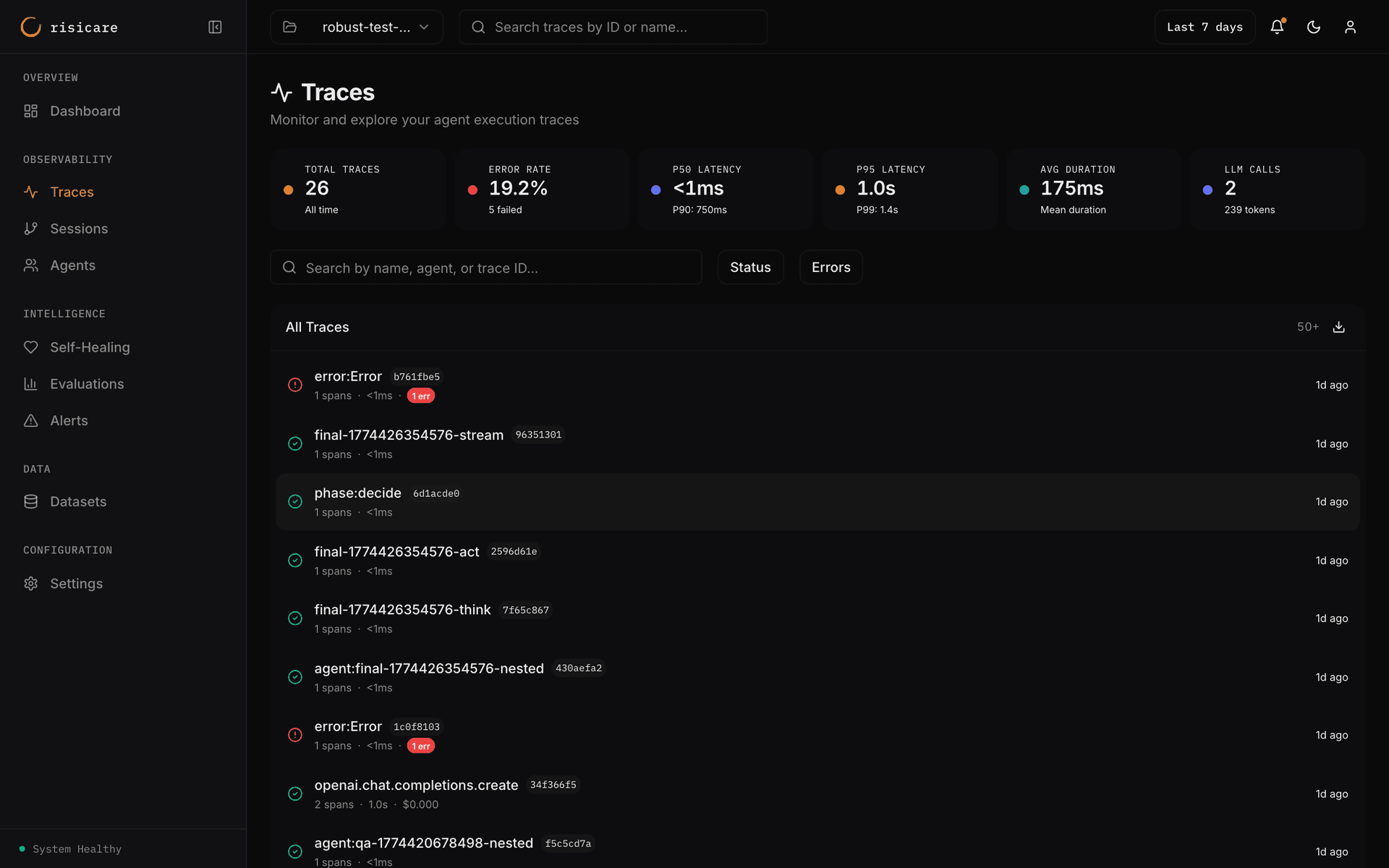
What You'll See
After running your agent, open the Risicare Dashboard. Traces usually appear within seconds. They can take longer when the platform is under load.
Each trace shows:
- Complete execution flow — Every LLM call, tool use, and decision point
- Token usage & cost — Automatic conversion to USD per model (OpenAI, Anthropic, etc.)
- Prompts & completions — off by default. Set
RISICARE_TRACE_CONTENT=true(ortrace_content=True) to capture request/response text - Timing breakdown — Latency per span, total trace duration
- Error detection — Failed calls are automatically flagged and classified
Minimum data needed
Tier 0 adds no decorators, so a trace appears only once your agent makes a call Risicare instruments — an LLM call, for example. If you don't see traces, check that:
- The startup line
[risicare] Tracing active — ...was printed - Your API key is set correctly:
echo $RISICARE_API_KEY - Your agent actually calls an LLM (OpenAI, Anthropic, etc.)
- The SDK is installed:
pip show risicare
Tier 1: Explicit Configuration
For more control—and to group related LLM calls into a single trace—use risicare.init() with @trace:
Without @trace, each LLM call is a separate trace
If you skip @trace, every LLM call appears as an independent trace in the dashboard.
Use @trace (decorator) or with trace("name"): (context manager) to group related calls.
Error Handling
Errors inside traced functions are automatically captured with full exception details:
import risicare
from risicare import trace

risicare.init(api_key="rsk-your-api-key")

from openai import OpenAI
client = OpenAI()

@trace
def risky_operation(query: str):
    # An exception raised here is recorded on the trace, then re-raised to you
    response = client.chat.completions.create(
        model="gpt-4o",
        messages=[{"role": "user", "content": query}],
    )
    return response.choices[0].message.content

try:
    risky_operation("What is quantum computing?")
finally:
    risicare.shutdown()  # once, when the program is done — flushes spans even after a failure
Call shutdown() once, at the end
risicare.shutdown() flushes pending spans and stops the SDK: nothing is recorded after it
until risicare.init() runs again. Call it when your program is finished, never inside a
function you call repeatedly. On a normal exit the SDK flushes by itself.
Reporting caught exceptions
Unhandled exceptions are captured automatically. For exceptions you catch without re-raising, use report_error() to record them on the trace:
from risicare import report_error

try:
    result = tool.execute()
except ToolError as e:
    report_error(e)      # Records the error and classifies it against the taxonomy
    result = fallback()  # Handle gracefully
The error gets a code from the 154-code taxonomy as it is recorded (the SDK assigns a subset of the codes — see Error Taxonomy). Root-cause analysis and ranked fix suggestions are held for the beta — see Diagnose for what runs today.
Tier 2: Agent Identity
Add agent identity to your code:
View Your Traces
Open the Risicare Dashboard to see:
- Traces: Complete execution flows with timing
- Spans: Individual LLM calls — with prompts and completions when content capture is on
- Costs: Token usage and cost breakdown by model
- Errors: Automatic error detection and classification
Next Steps
Progressive Integration
Learn about Tiers 3-5 for sessions, phases, and multi-agent support
SDK Configuration
Full configuration options and environment variables
Error Taxonomy
Understand how errors are classified automatically
Self-Healing
Root-cause analysis and fix recommendations — built, and held for the beta
Production & Failure Modes
Before you deploy: outage behavior, fork safety, and what you lose