Overview
How Risicare's self-healing pipeline is designed — and what is held.
Held for the beta — nothing past error classification runs
Stage 1 (detect and classify errors) runs today. Stages 2-3 (diagnose, then generate a fix recommendation) are built and held: a diagnosis cannot be requested and automatic diagnosis is off by default, so no new diagnosis or fix recommendation is produced. Stages 4-5 (deploy, validate) are built and gated off: a fix cannot be promoted and a deployment cannot be created, so no fix can go live, and the statistical validation and progressive rollout below have never run on real traffic.
Stage 6 (learn) is not connected: a knowledge store exists in the codebase, but nothing uses it.
Risicare's healing pipeline is designed to take a diagnosis, generate fix recommendations, validate them, and deploy the ones that work. This page describes that design.
Pipeline
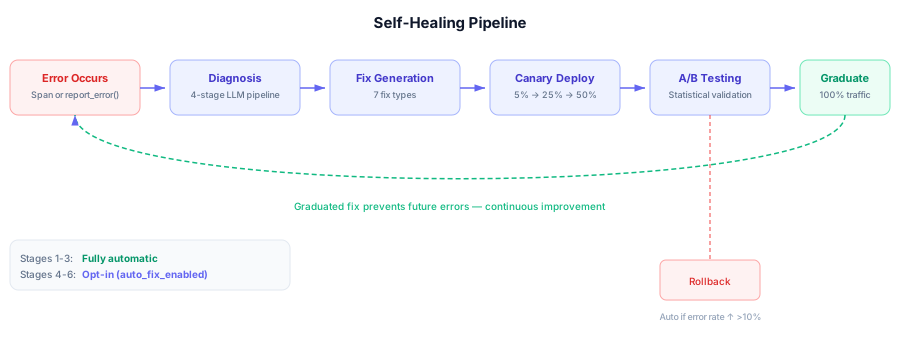
Diagnosis → Hypothesis Generation → Validation → Deployment → Learning
             ↓                        ↓            ↓           ↓
         Generate fix ideas     Test each one   Canary → A/B  Store pattern
How It Works
1. Receive Diagnosis
When an error is diagnosed, the healing pipeline receives:
- Error code (e.g.,
TOOL.EXECUTION.TIMEOUT) - Root cause analysis
- Context from the error trace
- Similar past errors (if any)
2. Generate Hypotheses
Create testable hypotheses about what might fix the issue:
Diagnosis: TOOL.EXECUTION.TIMEOUT on weather_api

Hypothesis 1: Retry with backoff (0.75 prior)
Hypothesis 2: Increase timeout (0.60 prior)
Hypothesis 3: Add fallback (0.55 prior)
3. Validate Statistically
Each hypothesis is tested:
- A/B Test: Split traffic between baseline and fix
- Measure: Error rate, latency, cost
- Analyze: Statistical significance (p < 0.05)
- Decide: Accept, reject, or continue testing
4. Deploy Safely
Not yet connected
Automatic fix deployment is not wired to the runtime yet. The auto_fix_enabled project setting exists but is inert today — no fix can be promoted, so nothing deploys regardless of the toggle. There is no way to read fixes generated before the hold with an API key during the beta, and the dashboard does not show them while diagnosis is held.
When connected, validated fixes will be deployed progressively:
Canary (5%) → Ramp (25%) → Ramp (50%) → Graduate (100%)
With automatic rollback if:
- Error rate increases >10%
- Latency exceeds 2x baseline
- Manual intervention
5. Learn (planned — not connected)
A learning stage is designed to turn successful fixes into reusable knowledge (error-pattern → fix-template mappings, shared across customers in federated form). A knowledge store exists in the codebase but is not connected to anything, and there is no pattern or fix-template store in production.
Fix Types
Risicare generates 7 types of fixes:
| Type | What It Does |
|---|---|
| Prompt | Modify system prompt |
| Parameter | Adjust LLM settings |
| Tool | Fix tool configuration |
| Retry | Add retry with backoff |
| Fallback | Use alternative strategy |
| Guard | Add validation |
| Routing | Change agent delegation |
No Code Injection
Declarative Fixes
Fixes are JSON configurations, not code. Risicare never injects code into your
system. Both the Python and JavaScript SDKs ship a Fix Runtime that
interprets these at runtime. The Fix Runtime is off by default since Python
0.4.0 and JavaScript 0.7.0: init() starts it only with fix_runtime=True
(Python) or fixRuntime: true (JavaScript). Each implements the same five
appliers (prompt, parameter, retry, fallback, guard); neither
implements tool or routing.
No fix can be put into a live status for the runtimes to apply: a fix cannot be promoted while fix deployment is gated off.
Example fix:
{
  "fix_id": "fix-abc123",
  "fix_type": "retry",
  "config": {
    "max_retries": 3,
    "initial_delay_ms": 1000,
    "exponential_base": 2.0,
    "max_delay_ms": 30000,
    "jitter": true,
    "retry_on": []
  }
}
Confidence Levels
Fixes have confidence scores:
| Confidence | Meaning |
|---|---|
| > 0.8 | High - strong recommendation |
| 0.6 - 0.8 | Medium - review suggested |
| < 0.6 | Low - suggest only |
Confidence drives recommendations, not deployment
Today, confidence scores rank fix recommendations for human review. They do not trigger any automatic deployment (stages 4-6 are not connected).
Dashboard (planned)
While diagnosis is held for the beta, Self-Healing is removed from the dashboard's navigation, and its page shows only a notice that diagnosis is not part of this release. As designed, it shows healing activity:
- Active Fixes: Deployed fixes (planned)
- Testing: Fixes in A/B testing
- Candidates: Suggested but not deployed
- Graduated: Successfully deployed
- Rolled Back: Failed fixes
Metrics
| Metric | Description |
|---|---|
| Fix Rate | % of errors with deployed fixes |
| Success Rate | % of fixes that graduate |
| MTTR | Mean time to remediation |
| Error Reduction | % error reduction from fixes |