Spans
Individual operations within a trace.
Spans represent individual operations within a trace, forming a tree structure.
Span Kinds
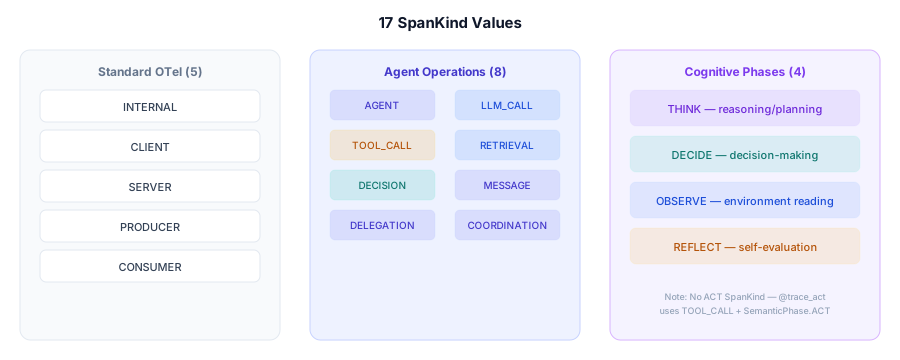
Every span has a kind field indicating its role. These are the 17 SpanKind values:
Standard Kinds
| Kind | Description | Auto-Created |
|---|---|---|
internal | Default, internal operation | - |
server | Server-side of RPC | - |
client | Client-side of RPC | - |
producer | Message producer | - |
consumer | Message consumer | - |
Agent-Specific Kinds
| Kind | Description | Auto-Created |
|---|---|---|
agent | Agent lifecycle span | @agent decorator |
llm_call | LLM API call | Yes (auto-instrumented) |
tool_call | Tool/function execution | Yes (auto-instrumented) |
retrieval | RAG retrieval operation | Yes (framework integration) |
decision | Agent decision point (generic) | Manual |
delegation | Delegation to another agent | @trace_delegate decorator |
coordination | Multi-agent coordination | @trace_coordinate decorator |
message | Inter-agent message | @trace_message decorator |
Phase-Specific Kinds
| Kind | Description | Auto-Created |
|---|---|---|
think | Reasoning/planning phase | @trace_think decorator |
decide | Decision-making phase | @trace_decide decorator |
observe | Environment observation phase | @trace_observe decorator |
reflect | Self-evaluation phase | Manual |
SpanKind vs SemanticPhase
There is no SpanKind.ACT. The @trace_act decorator uses SpanKind.TOOL_CALL for the span kind and sets SemanticPhase.ACT as context metadata. SemanticPhase is a separate enum with 7 values: THINK, DECIDE, ACT, REFLECT, OBSERVE, COMMUNICATE, COORDINATE.
Span Attributes
Common Attributes
| Attribute | Type | Description |
|---|---|---|
span_id | string | Unique 16-char hex ID |
trace_id | string | Parent trace ID (32-char hex) |
parent_span_id | string | Parent span ID |
name | string | Span name |
kind | string | Kind from the tables above |
start_time | timestamp | Start time |
end_time | timestamp | End time |
duration_ms | number | Duration in milliseconds |
status | string | unset, ok, or error |
LLM Span Attributes
| Attribute | Description |
|---|---|
gen_ai.system | Provider (openai, anthropic, google, etc.) |
gen_ai.request.model | Requested model name |
gen_ai.response.model | Model name returned by API |
gen_ai.response.id | Response ID |
gen_ai.usage.prompt_tokens | Input tokens |
gen_ai.usage.completion_tokens | Output tokens |
gen_ai.usage.total_tokens | Total tokens |
gen_ai.request.temperature | Sampling temperature |
gen_ai.request.max_tokens | Max output tokens |
gen_ai.request.stream | Whether streaming was used |
gen_ai.request.has_tools | Whether tools were provided |
gen_ai.completion.tool_calls | Number of tool calls |
gen_ai.completion.finish_reason | Stop reason |
gen_ai.latency_ms | Request latency in milliseconds (set by the provider instrumentation; the span's overall duration_ms also carries timing) |
Tool Span Attributes
| Attribute | Description |
|---|---|
tool.name | Tool name |
tool.input | Tool input (JSON) |
tool.output | Tool output (JSON) |
tool.error | Error message if failed |
Agent Span Attributes
| Attribute | Description |
|---|---|
agent.name | Agent name |
agent.role | Agent role |
agent.id | Unique agent instance ID |
agent.parent_id | Parent agent ID |
agent.iteration | Loop iteration number |
Span Hierarchy
Spans form a tree rooted at the trace:
# This code creates:
# Trace
# └── Agent Span (orchestrator) [kind: agent]
#     ├── Think Span [kind: think]
#     │   └── LLM Span [kind: llm_call]
#     ├── Decide Span [kind: decide]
#     │   └── LLM Span [kind: llm_call]
#     └── Act Span [kind: tool_call]
#         └── Tool Span [kind: tool_call]

@agent(name="orchestrator")
def run():
    @trace_think
    def think():
        return llm.generate("Analyze...")

    @trace_decide
    def decide():
        return llm.generate("Plan...")

    @trace_act
    def act():
        return tool.execute()

    think()
    decide()
    act()
Error Spans
When an operation fails:
{
    "span_id": "abc123def4567890",
    "kind": "llm_call",
    "status": "error",
    "error": {
        "type": "ToolExecutionError",
        "message": "API timeout after 30s",
        "code": "TOOL.EXECUTION.TIMEOUT",
        "stack_trace": "..."
    }
}
Custom Spans
Create custom spans for any operation:
from risicare import get_tracer

def process_data():
    tracer = get_tracer()
    with tracer.start_span(
        "data_processing",
        attributes={"batch_size": 100},
    ) as span:
        result = do_processing()
        span.set_attribute("records", len(result))
        return result
Span Events
Add events within a span:
from risicare import get_tracer

tracer = get_tracer()
with tracer.start_span("pipeline") as span:
    span.add_event("stage_1_complete", {"records": 100})
    process_stage_1()

    span.add_event("stage_2_complete", {"records": 95})
    process_stage_2()
Performance Analysis
Parallel Execution
Spans at the same level with overlapping times indicate parallel execution.
Bottlenecks
The waterfall orders spans by start time, and you can expand and collapse the children of a span. It has no sort by duration and no filter by kind.