Agents
Multi-agent observability and analytics.
Read agent data in the dashboard — the REST API is not public yet
What runs today: agent activity is captured and shown in the dashboard. Everything on this page about how agents are identified, and how their behaviour is compared, is current.
What does not run yet: the agent REST endpoints are not exposed outside the platform in this release, so a request from your own machine cannot reach them. The REST API reference describes them for when they are.
Track individual agent performance and inter-agent interactions.
Agent Identity
Define agent identity in your code:
from risicare import agent

@agent(name="researcher", role="specialist")
def research_agent(query: str):
    # Agent code here
    pass
Or with context managers:
from risicare import agent_context

with agent_context(
    "planner-001",                   # agent_id (required, positional)
    agent_name="planner",
    agent_role="orchestrator",
    agent_type="custom",
    version=1,
):
    # Agent code here
    pass
Agent Attributes
| Attribute | Type | Description |
|---|---|---|
agent_id | string | Unique instance ID (required, first positional argument) |
agent_name | string | Human-readable agent name (falls back to agent_id) |
agent_role | string | orchestrator, worker, specialist, etc. |
parent_agent_id | string | Parent in hierarchy (set automatically when nesting) |
agent_type | string | Framework-specific type (langgraph, crewai, autogen, custom) |
version | int | Agent version number |
metadata | dict | Custom agent metadata |
Agent Roles
| Role | Description |
|---|---|
orchestrator | Coordinates other agents |
worker | Executes assigned tasks |
supervisor | Monitors and validates |
specialist | Domain expert |
router | Routes messages/tasks |
aggregator | Aggregates results |
broadcaster | Broadcasts to multiple agents |
critic | Reviews and critiques |
planner | Creates execution plans |
executor | Executes plans |
retriever | Retrieves information |
validator | Validates outputs |
JS SDK has a different role set
The JavaScript SDK's AgentRole enum has 14 values — the 12 shared with Python plus reviewer and custom. See the JS SDK reference for the full list.
Agent Dashboard
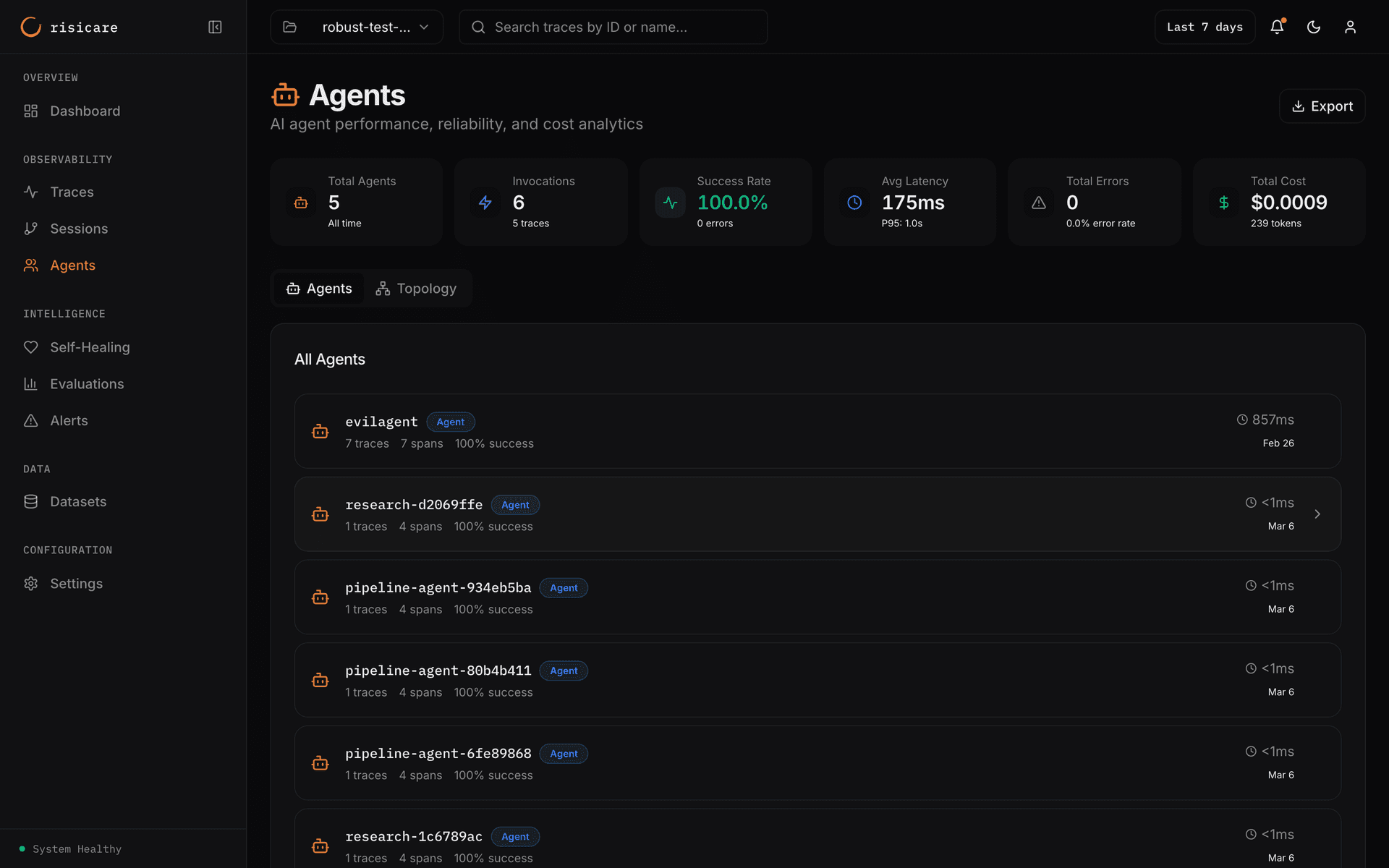
The KPI strip shows: Total Agents, Invocations (with trace count), Success Rate (with errors), Avg Latency (with P95), Total Errors (with error rate), and Total Cost (with tokens).
Agent List
View all agents with metrics:
| Column | Description |
|---|---|
| Name | Agent name, with a type badge |
| Errors | Error count, when the agent has errors |
| Traces, spans | Counts for the agent |
| Success | Success percentage |
| Avg Duration | Average duration |
| Last seen | When the agent last ran |
Agent Detail
Deep dive into a single agent:
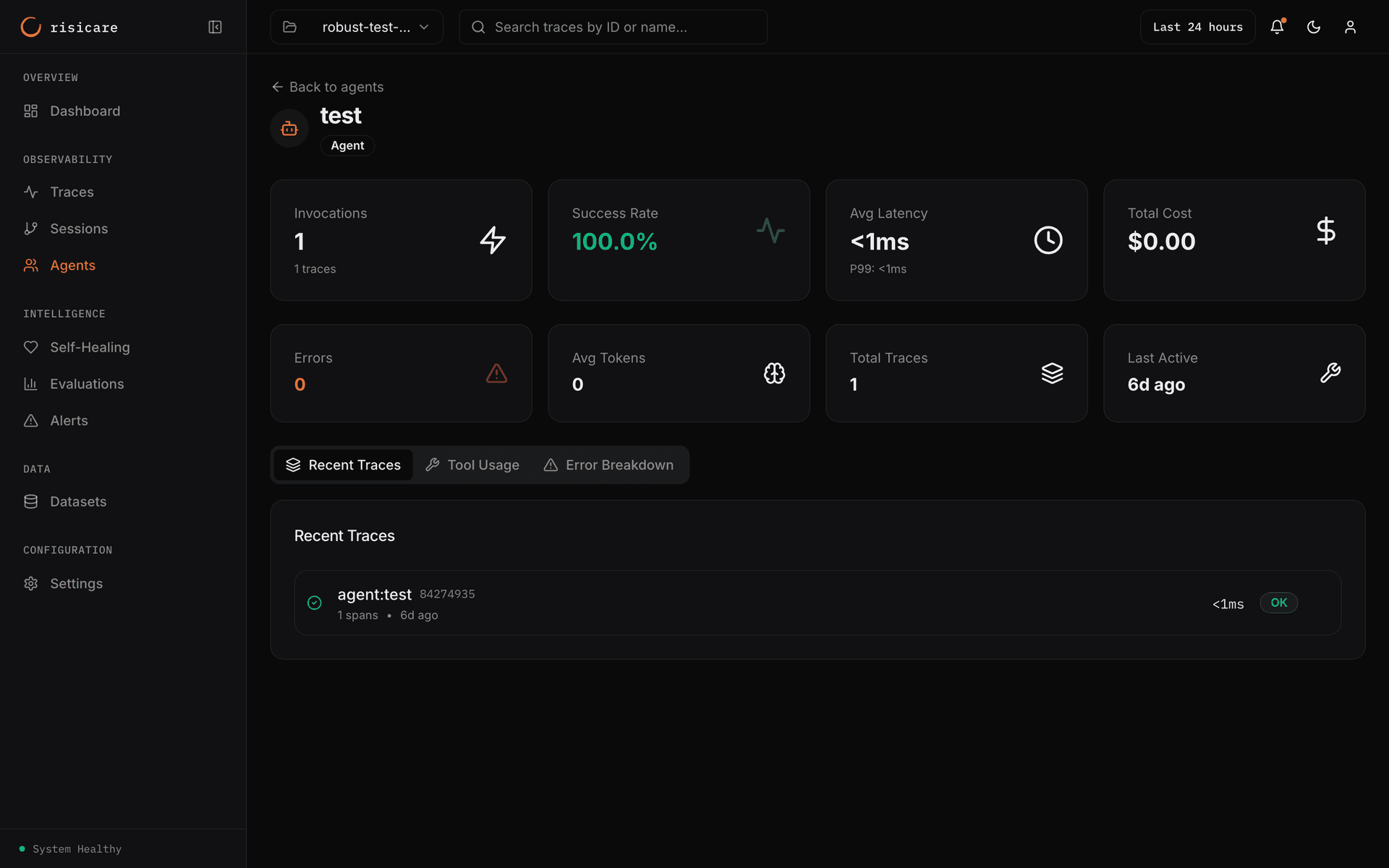
The agent page shows KPI cards and three tabs: Recent Traces, Tool Usage and Error Breakdown.
Some agent values are not shown
The agent metrics derived from span/trace data are live today: invocations, success/error rate (from has_error), latency percentiles, token usage, cost, and semantic_phase (captured end-to-end). A second set of agent-semantic values — iteration / max_iterations, delegation depth, and per-phase time splits (think/decide/act_time) — is not shown: the dashboard has no field for them. Rely on the span-derived metrics above.
Agent Hierarchy
Track parent-child relationships:
@agent(name="orchestrator", role="orchestrator")
def orchestrator():
    with agent_context(
        "researcher-001",
        agent_name="researcher",
        agent_role="specialist",
    ):
        research()

    with agent_context(
        "writer-001",
        agent_name="writer",
        agent_role="specialist",
    ):
        write()
Visualized as:
orchestrator (orchestrator)
├── researcher (specialist)
└── writer (specialist)
Inter-Agent Communication
Track messages between agents:
from risicare import trace_message

@trace_message(target="researcher-001", target_name="Researcher")
def send_research_request(task: str):
    return researcher.process(task)
Message Types
What the SDK actually emits today
The SDK decorators (trace_message, trace_delegate, trace_coordinate) only emit three message types: message, delegation, and coordination. The broader MessageType enum below is reserved for manual/aspirational use — those values are not produced automatically by the SDK and must be set by hand on the span if you need them.
| Type | Description |
|---|---|
task | Task assignment |
result | Task result |
status | Status update |
error | Error notification |
query | Information request |
response | Information response |
broadcast | Broadcast to all |
direct | Direct message |
proposal | Propose action |
vote | Vote on proposal |
consensus | Consensus reached |
conflict | Conflict detected |
heartbeat | Agent alive signal |
shutdown | Shutdown signal |
handoff | Handoff to another agent |
JS SDK has a different message type set
The JavaScript SDK's MessageType enum has 18 values (e.g. REQUEST, RESPONSE, DELEGATE, COORDINATE, BROADCAST, VOTE, HANDOFF, …). See the JS SDK reference for the full list.
Message Attributes
The published Python SDK records the target agent on message and delegation spans:
| Attribute | Description |
|---|---|
message.target_agent_id | Receiving agent ID |
message.target_agent_name | Receiving agent name |
The SDK does not record sender, receiver, message_type, content or correlation_id attributes; set them yourself with set_attribute() if you need them.
Agent Delegation
Track when agents delegate tasks:
from risicare import trace_delegate

@trace_delegate(target="executor-001", target_name="Executor")
def delegate_execution(plan: dict):
    return executor.execute(plan)
Agent Analytics
Topology
The Topology tab of the Agents page shows the agents as a sunburst or as a treemap, grouped by name prefix. The dashboard has no network graph of agent interactions.
Agent Iterations
Record iteration counts on iterative agent loops via agent metadata. (Note: this stores the value in the span's metadata; the dedicated iteration / max_iterations agent analytics are not yet auto-populated — see the in-flight note above.)
@agent(name="refiner", role="specialist")
def iterative_refine(content: str, max_iterations: int = 3):
    for i in range(max_iterations):
        with agent_context(
            "refiner-001",
            agent_name="refiner",
            metadata={"iteration": i + 1}
        ):
            content = refine_step(content)
            if is_good_enough(content):
                break
    return content
Filtering Agents
The Management API is not available with an API key during the beta, so you cannot filter agents over HTTP. There is no field:value query language — a filter such as name:researcher or error_rate:>0.1 is not supported.